AI Reel Editor: The Complete 2026 Guide to AI Reel Makers, Generators & Creators
What is an AI reel editor, and which one should you use? A complete 2026 guide to AI reel makers, generators and creators — how they work, free vs. watermark-free exports, and the feature checklist that matters.

AI Reel Editor: The Complete 2026 Guide to AI Reel Makers, Generators & Creators
Search for an AI reel editor today and you get a wall of tools calling themselves slightly different things: an AI reel maker, an AI reel generator, an AI reels creator, an automatic reels maker, a video reel maker. Most of them do overlapping jobs. A few of them do the one job that actually matters — getting a finished, postable 9:16 video out the door.
This guide is the honest version. What an AI reel editor really is, how the underlying workflow works, which features separate a usable tool from a demo toy, what "free AI reel generator without watermark" actually means in practice, and how to pick the right category of tool for the kind of content you post.
If you just want to start editing, open Create Studio. If you want to understand the landscape first, keep reading.
What Is an AI Reel Editor?
An AI reel editor is a video editor built specifically for short-form vertical video — Instagram Reels, TikTok, and YouTube Shorts — where artificial intelligence handles the repetitive editing decisions: finding the good moments in your footage, transcribing and animating captions, cropping to 9:16, timing cuts to music, and grading the shot.
You still direct the video. The AI removes the parts of editing that are mechanical rather than creative.
That's the definition. The confusion comes from the naming, because every tool in this space markets itself with a different noun:
| What people search | What it usually means |
|---|---|
| AI reel editor | Full editing surface — AI assists, but you can change anything |
| AI reel maker / reel maker | Same thing, marketing-friendly phrasing |
| AI reel generator / AI reel video generator | Emphasis on the auto-draft step: input → finished draft |
| AI reels creator / AI reel creator | Usually template-driven, pick-a-style tools |
| Automatic reels maker | One-click, minimal-input generation |
| Video reel maker | Broader term, often includes non-AI slideshow tools |
| Reels tools | The whole category: captions, resizers, schedulers, editors |
In practice, they're synonyms with different amounts of manual control attached. The important question isn't which noun a tool uses — it's how much of the edit you can still change after the AI is done.
How AI Reel Editors Work
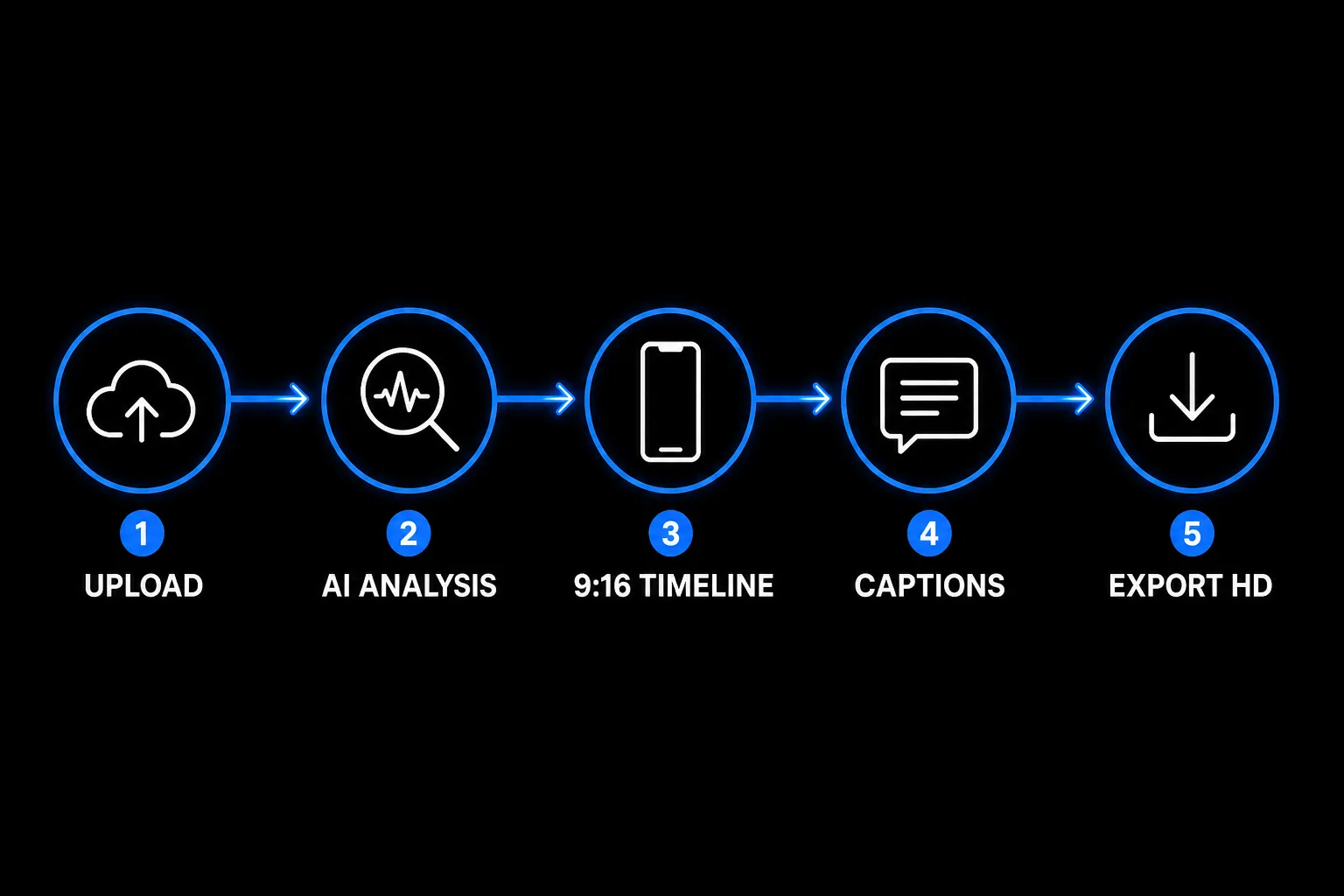
Almost every serious tool in this category runs the same five-stage pipeline. Understanding it makes it obvious why some AI reels look generic and others don't.
1. Input and analysis
You upload clips, photos, or a long video — a podcast, a stream, a tutorial. The AI analyzes it. Good tools use both motion detection (where is something visually happening) and speech analysis (where is something being said that lands) rather than just chopping the file into fixed-length chunks.
This is the step that decides whether your reel has a hook. Our deep-dive on this is here: Extracting Video Highlights Automatically Using AI.
2. Assembly into a 9:16 timeline
Selected moments get placed on a vertical canvas. A real AI video editor for reels treats 9:16 as the native format — not a landscape sequence with a crop applied at export. Subjects stay framed; you don't get a letterboxed video with black bars top and bottom.
3. Captions
Audio is transcribed and rendered as animated, word-by-word text. This isn't cosmetic. A large share of the feed scrolls muted, and captions are one of the highest-leverage retention levers available — we broke down the numbers in Why Auto-Captions Boost Reel Views.
4. Polish: music, beat-sync, Looks
Cuts get timed to the beat of your track, color grades ("Looks") get applied, motion effects add movement to static shots. If you're building from photos rather than footage, this stage is what makes the difference — see Turning Static Images Into Beat-Synced Reels.
5. Export
Rendered to 1080p vertical, ready to upload to Instagram, TikTok, or YouTube. Cloud rendering means your laptop isn't doing the work.
The whole loop should take minutes, not an afternoon. If a tool makes any single stage of that pipeline take longer than it would have taken you manually, it isn't helping.
Types of AI Reel Tools in 2026
Not everything marketed as an AI reel editor does the same job. Four distinct categories exist, and picking the wrong one is the most common reason people bounce between tools.
| Tool type | What it does well | Where it breaks down | Best for |
|---|---|---|---|
| Pure AI reel generator | One prompt or one upload → finished draft in seconds | You can't fix the caption wording or move a sticker; every output looks templated | High-volume faceless pages |
| Template-based reels creator | Consistent branded look, very fast | Your reel looks like everyone else's reel | Businesses posting repeatable formats |
| AI reel editor (full surface) | AI draft plus real editing — text, position, timing, keyframes | Slightly more to learn than a one-click generator | Creators who post regularly and care how it looks |
| Manual timeline NLE (Premiere, Final Cut) | Total control, multicam, complex compositing | 1–3 hours per reel; requires a powerful machine | Long-form and client work, not daily shorts |
The sweet spot for most people posting short-form consistently is the third row: let AI build the first cut, then finish it yourself. Generation without control produces content nobody engages with; control without generation produces burnout. We wrote about that gap specifically in Finish Your Edit in an AI Reel Maker.
Free vs. Paid: What "Free AI Reel Generator Without Watermark" Really Means
This is the single most searched qualifier in the category, and it's worth being precise, because "free" means four different things across the tools you'll compare:
- Free with a watermark — you can export, but the tool's logo is burned into your video. Fine for testing, bad for a brand account.
- Free trial — full features, then a hard paywall after 3–7 days.
- Free tier with export credits — a real allowance of clean exports, then you upgrade if you need more volume. This is the model that's usually actually usable.
- Free but resolution-capped — no watermark, but 720p or lower, which looks soft next to native uploads.
For reference, here's how it works on MakeAIReel: new accounts get 10 HD export credits on signup, plus free AI Highlight runs, free AI captions, beat-sync, Looks, and royalty-free stock from Pexels and Pixabay. Free-tier exports may carry a watermark; paid plans remove it and add commercial rights. One useful quirk: a premium export with exactly one clip on the timeline doesn't deduct a credit, even at zero credits.
If your priority is a genuinely free workflow start to finish, we walk through it step by step here: How to Make Reels with AI (For Free).
The practical test for any free reel maker: export one real video before you invest an hour in it. If the watermark, resolution, or credit rules are going to be a problem, you'll find out in five minutes instead of five days.
The Feature Checklist That Actually Matters
When comparing any AI reel maker, AI reel generator, or reels tool, these are the features that change your output quality. Everything else is packaging.
- Native 9:16 canvas — vertical by default, not a crop setting hidden in export options.
- Automatic captions you can edit — auto-transcription is table stakes in 2026; being able to fix a misspelled name without re-rendering is not.
- AI highlight detection on long uploads — turns a podcast or stream into multiple clips in one pass instead of manual scrubbing.
- Beat-sync — cut timing matched to your music track, which is most of what makes a montage feel professional.
- Color grades and motion effects — a Look plus a slow push turns flat footage into something that holds attention.
- Direct manipulation of layers — tap a caption or sticker on the preview and move it, rather than hunting for X/Y fields in a sidebar.
- Cloud rendering — your machine shouldn't be the bottleneck, and you shouldn't need a GPU.
- Clean HD export with commercial rights — watermark-free 1080p you're actually allowed to use for a business account.
If a tool is missing three or more of these, it's a reels tool, not an editor — useful for one task, not for owning your workflow.
AI Reel Editor for Instagram vs. TikTok vs. YouTube Shorts
People search separately for an AI Instagram reel maker, an AI Instagram reel generator, and a Shorts tool — but the technical requirement is nearly identical across all three. All are 9:16, all are 1080p, all reward a hook in the first three seconds.
The real differences are editorial, not technical:
| Platform | Typical length that performs | What the format rewards |
|---|---|---|
| Instagram Reels | 15–30s | Strong visual hook, clean captions, trending audio |
| TikTok | 21–60s | Conversational pacing, native-feeling edits, on-screen text |
| YouTube Shorts | 30–60s | Clear payoff, retention through the full loop, searchable topic |
Which means: you don't need three tools. One vertical export works everywhere. What changes is your hook, your caption copy, and your length — not your editor. Anyone selling you a platform-specific AI Instagram reels creator is selling you the same 9:16 render with different marketing.
MakeAIReel: One AI Reel Editor for the Whole Workflow
MakeAIReel is a browser-based AI reel editor built around the generate-then-finish model — AI does the first cut, you keep full control of the last 10%.
| Capability | What it does |
|---|---|
| AI Highlights | Upload a long video; motion + speech analysis finds the strong moments and drops them on your timeline |
| Free AI captions | Animated, word-by-word text, editable after generation |
| Beat-sync | Cuts timed automatically to your music track |
| Looks & motion effects | 20+ color grades plus movement on static shots |
| Stock library | Royalty-free clips from Pexels and Pixabay |
| Images to video | Hold stills with adjustable duration, captions and Looks applied |
| AI voiceovers | Multiple natural voices for faceless content |
| Prompt → video (Pro) | Generate cinematic AI clips from text |
| Voice cloning (Pro) | Narrate in your own voice |
| Background removal (Pro) | One-click, no green screen required |
No install, no GPU, no desktop app — the entire edit happens at makeaireel.com/create, and exports come out as 1080p 9:16 files ready for any platform.
Which Tool Should You Actually Pick?
Short version, by what you're trying to do:
- Posting daily to a faceless page? Prioritize AI Highlights, AI voiceover, and batch speed. Start with Automate Faceless YouTube Shorts.
- Repurposing a podcast or long video? Highlight detection quality is the only feature that matters. See the AI video highlight generator guide.
- Selling a product? You need photos-to-video and clean text placement — Product Photos Into Videos.
- Comparing specific tools head to head? We did that separately in Best AI Reel Editor in 2026.
- Just want a free reel today? How to Make Reels with AI (For Free).
The Bottom Line
An AI reel editor is worth using when it collapses the mechanical parts of reel creation — the cropping, the transcribing, the beat-matching — without taking the creative decisions away from you. Tools that only auto-generate get you a draft that looks like everyone else's. Tools that only give you a timeline get you burnout.
Pick the one that lets you make a reel in minutes and change the caption after. Then post consistently — because in short-form, volume with taste beats one perfect video every time.
Frequently Asked Questions
What is an AI reel editor? +
What's the difference between an AI reel maker and an AI reel generator? +
Is there a free AI reel generator without a watermark? +
Can AI create Instagram Reels for me automatically? +
How do I make AI reels if I've never edited video before? +
Do I need a separate tool for Instagram Reels, TikTok, and YouTube Shorts? +
Do I need a powerful computer to run an AI video editor for reels? +
How long does it take to make a reel with an AI reel editor? +
Can I use AI-generated reels commercially? +
Want to automate your video workflow?
Get Started with MakeAIReel