Make Your Photo Talk: AI Talking-Actor Reels for UGC-Style Ads (2026)
Turn one photo into a talking presenter for a UGC-style ad. How MakeAIReel's AI talking actor lip-syncs your photo to the reel's hook, what photo works best, timing, limits and AI-label rules.
Make Your Photo Talk: AI Talking-Actor Reels for UGC-Style Ads
Short answer: On MakeAIReel Pro, attach one clear, front-facing photo and ask for the reel with your photo "talking". The AI lip-syncs the photo to the first line of your voiceover, so the reel opens like a UGC ad: a person speaking the hook straight to camera. Then it cuts to your product, your clips or designed motion graphics (rep counters, timers, plan calendars, offer cards) and ends on your call to action. Previews show the still photo; the talking clip is generated once, on HD export.
What is an AI talking-actor reel?
A talking-actor reel is a short vertical ad that starts with a presenter talking to camera. That opening is what makes UGC-style ads stop the scroll: a face and a direct line in the first two seconds. Traditionally you'd need a creator, a camera and a retake or three. With an AI talking actor you need one photo and a script.
In MakeAIReel the talking part is deliberately short: it covers the hook, usually 4 to 8 seconds. The rest of the reel shows what you're selling. That keeps it believable, and it keeps generation fast and inside your plan.
How does it work in MakeAIReel?
- Attach a photo. In the Reel Creator, attach the photo and say something like "make my photo talk and open the reel with it". In Studio, select the opening photo and switch on AI talking actor.
- The AI writes the reel around it. The photo becomes the first scene, kept to 2 to 8 seconds, and the voiceover's opening line is written for it. The AI picks a narration voice that suits the presenter, or uses the voice you ask for ("female voice", "deep voice") or your cloned voice.
- Preview for free. Drafts show the still photo, so you can change the script, the scenes or the music as often as you like without generating anything.
- Export in HD. You confirm once, and the talking clip is generated: the photo is lip-synced to the exact stretch of voiceover it covers. The export takes about 3 to 5 minutes longer. Export the same reel again and the clip is reused.
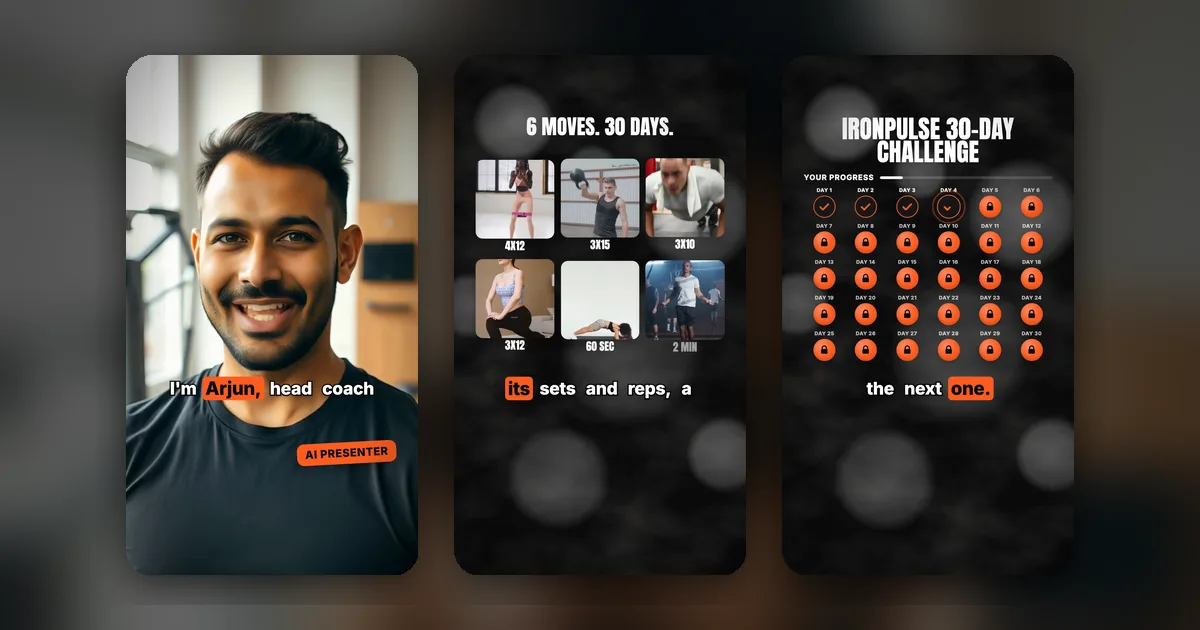
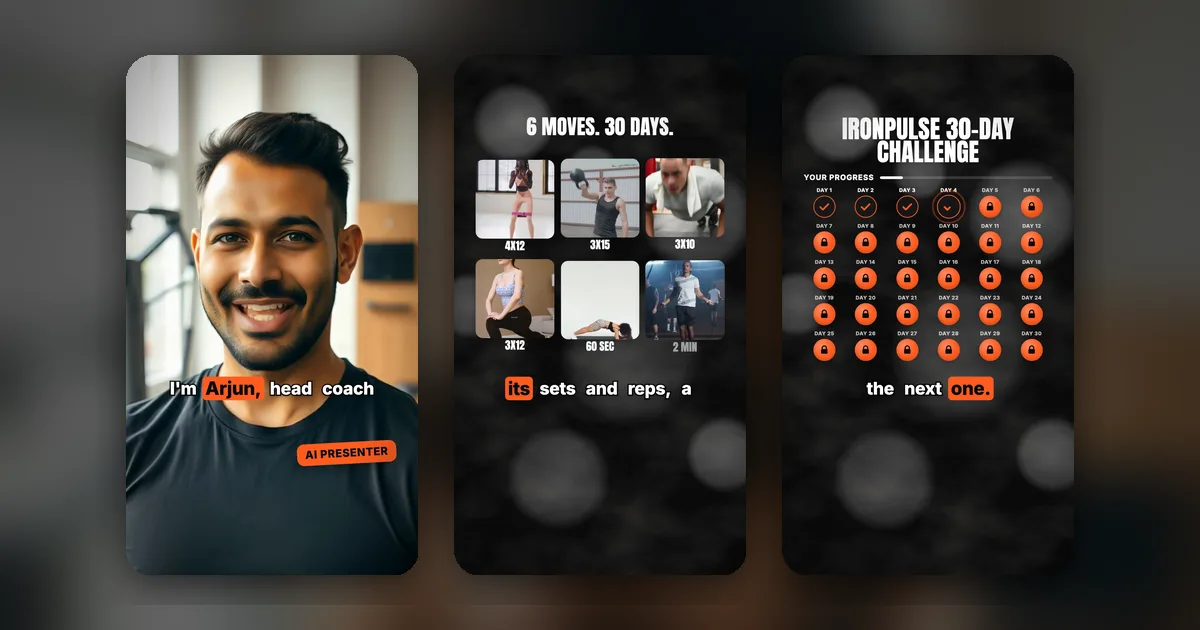
Demo: the coach is AI-generated and IronPulse is a fictional brand. Watch the reel.
No photo? The AI makes the presenter
You don't have to upload anyone. Describe your reel, for example "30-day home workout challenge for beginners, coach talking to camera", and when the idea suits a person speaking to the viewer, MakeAIReel creates a fictional, photoreal AI presenter who fits your brand and audience, then lip-syncs them to the hook. You can also just ask for one: "add a presenter talking to camera". Every new version of the reel keeps the same presenter, so you never pay twice for the same face. AI presenters are never modelled on real or famous people.
What photo works best?
- Front-facing, eyes to camera, face well lit and in focus. A slight smile is fine.
- Head and shoulders, with some space above the head. Full-body shots leave the face too small to animate well.
- One person only, nothing covering the mouth (no hands, mic or mask).
- Vertical or square. The clip fills a 9:16 frame.
- Your own photo, or one you have permission to use.
What comes after the talking hook?
The AI Director fills the rest of the reel with scenes that fit what you sell:
| Scene | Good for |
|---|---|
| Tile grid of moves, dishes or products with short labels | Workout routines, menus, collections |
| Timer ring with a big label such as "3X15" or "60 SEC" | Exercises, recipe steps, routines |
| Plan calendar with done, locked and unlocking days | 21- or 30-day challenges, courses |
| Stat and checklist cards, offer cards, product callouts | Features, prices, discounts |
| End card with your brand and call to action | Every reel |
Numbers on screen (reps, days, prices) are only used when you gave them in your brief, never invented.
Is it allowed? Consent and AI labels
- Consent. Only use your own face or a face you have permission to use. Don't use celebrities, customers or anyone who hasn't agreed.
- Truthful claims. A talking presenter makes claims sound personal. Keep them accurate, and don't present an AI presenter as a real customer review.
- Label it. Instagram, TikTok and YouTube ask creators to label realistic AI-generated or AI-altered people. Turn the label on when you post.
What are the limits?
- Pro plan: 10 talking-actor clips every 30 days. Previews and re-exports of the same reel don't use one, and a clip that fails to generate is given back.
- Needs a voiceover, since the photo lip-syncs to it.
- Opening scene only, 2 to 10 seconds long.
- Generation adds about 3 to 5 minutes to the export. If it doesn't succeed, your reel still exports with the still photo.
Frequently Asked Questions
Can AI make my photo talk in a reel?
Yes, on MakeAIReel Pro. Attach a clear, front-facing photo and ask the Reel Creator to "make my photo talk", or switch on AI talking actor on the opening photo in Studio. The photo is lip-synced to the first line of your voiceover and opens the reel; the rest of the reel uses your product clips or motion graphics.
How long does it take to make the talking clip?
About 3 to 5 minutes, once, when you export in HD. In our own test a 6.5 second talking clip took about 3.5 minutes end to end. Previews show the still photo, and exporting the same reel again reuses the clip.
Can I use someone else's photo?
Only with their permission. Use a photo of yourself, or of a person who has agreed to appear as the presenter.
Do I need to label an AI talking presenter?
Usually yes. Instagram, TikTok and YouTube ask creators to label realistic AI-generated or AI-altered people. Turn on the platform's AI label when you post.
How much does the AI talking actor cost?
It's part of the Pro plan ($20 for 30 days), which includes 10 talking-actor clips every 30 days. See pricing.
Ready to try it? Open the Reel Creator, attach your photo and describe your offer.
Want to automate your video workflow?
Get Started with MakeAIReel